The Global Regulatory Readiness Platform
From the factory floor to the checkout — one scan for the compliance the modern supply chain runs on.
If a system’s principles are universal, who actually counts as covered by them? Who are the users?
Including Agentic Commerce Readiness— the checkout-convergence layer this work named and scored on March 3, 2026.
Supply-chain due diligence, trade compliance, digital accessibility (EAA / WCAG 2.2 AA), and AI-agent readiness used to be separate problems handled by separate tools. They converge. From factory metadata to the checkout, the clean, well-structured data an autonomous shopping agent needs to transact is the same data a human with a screen reader needs to navigate — and the same data a regulator expects you to be able to show. SmarterTariff scores that readiness across the chain in one zero-integration, non-invasive scan, turning compliance from a defensive legal burden into unified infrastructure for the future of trade.
The first generation shipped before this work existed. Instant Checkout, Agent Pay, AP2. Three protocols, three vendors, and no shared compliance layer between any of them. On March 3, 2026, this work named and scored the layer all three were missing.
Within three weeks the market tested the thesis in public, and did the testing for us. The flagship agentic checkout was publicly reported to convert at roughly a third the rate of the merchant’s own site, on the retailer’s own account. Days later its operator revamped the product, stating that it would let merchants use their own checkout experiences
while it refocused on discovery. The roadmap reverted. The agent retreated to the merchant’s checkout, which is the surface this score measures and where the statutory obligation already sits.
None of that fragmentation has been fixed. Every protocol still terminates at a checkout nobody is scoring, and the liability stays with the merchant. Their rockets keep blowing up on the pad. The scoring method here has not changed since launch, because it was built to measure the thing that keeps blowing theirs up.
- Mar 3, 2026
- First commit · git 56559b2
- Jul 24, 2026
- PCT application filed · claims priority from earlier US provisionals
- Multi-framework
- EAA · WCAG 2.2 AA · CSRD · CSDDD · UFLPA · EUDR
- US + Canada
- Sovereign technology · solo founder
One scan, one platform: the checks behind it
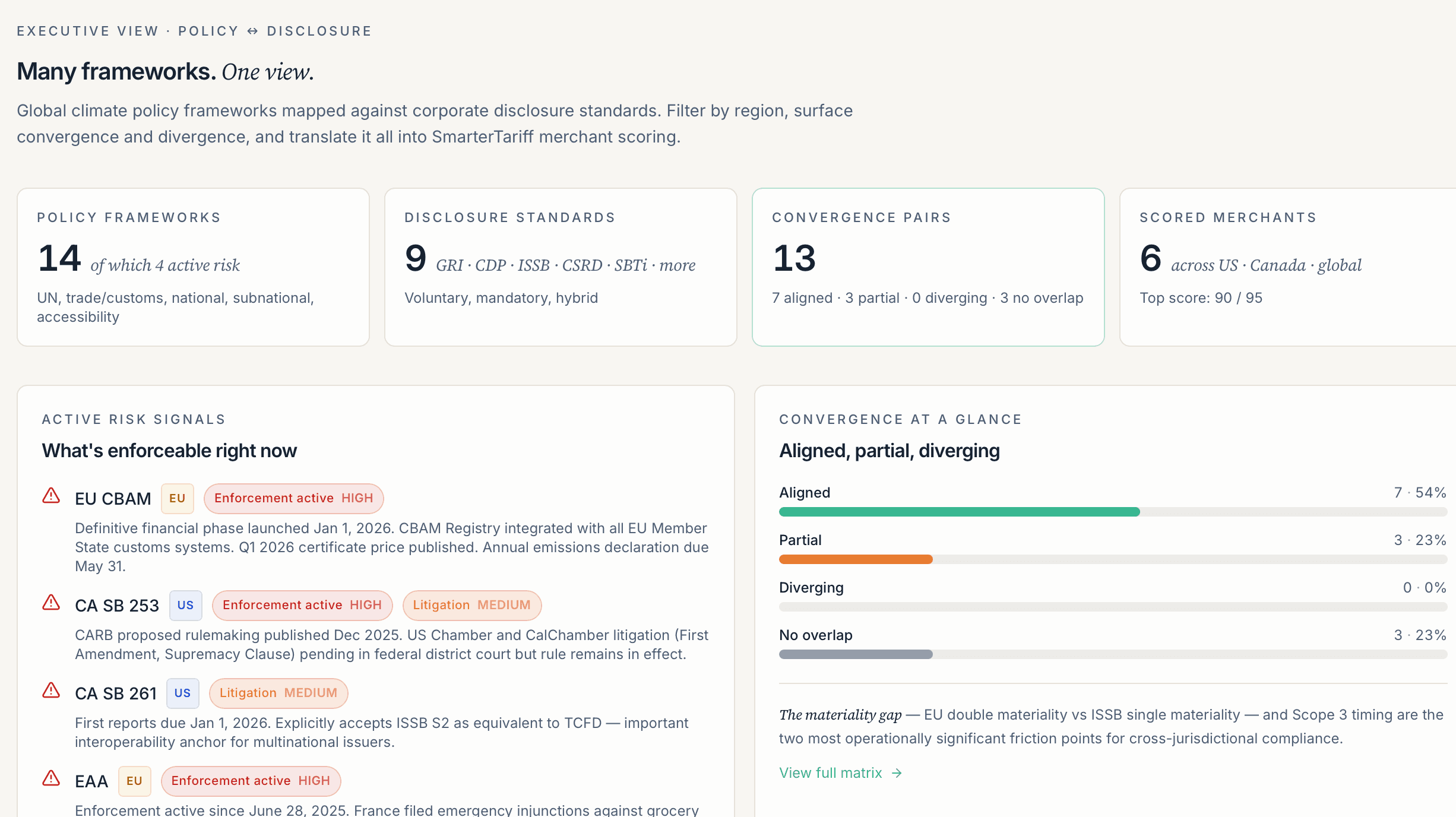
- GroundTruthExecutive orders and policy mapped to international norms, treaties, and the UN SDGs.
- AI VisibilityWhether autonomous AI shopping agents can find and complete your checkout.
- Logistics & Disaster RiskSupply-chain and logistics disruption exposure across your sourcing.
- Domestic SourcingMade-in-America and CUSMA-compliant Canadian sourcing signals.
- Merchant of RecordCharge-descriptor and phantom-invoice risk in the buying flow.
- TOS “House of Cards”If shoppers can't access checkout, your terms of service may be unenforceable.
E-Commerce · Supply Chain · Digital accessibility · Trade compliance · EAA · ADA · UN SDGs · EU AI Act · Privacy First
One Single, Universal, No-Integration Scan covers Physical and Digital trade, Modern Compliance, Human accessibility, and Agentic Commerce.
Why acquire this infrastructure?
Every compliance protocol. One global chokepoint.
Not a fragmented vendor tool: a compliance-scoring layer for automated trade, patent-pending and filed under the Patent Cooperation Treaty. The thesis was published before the market tested it, and the market tested it in public.
Inclusivity as Infrastructure.
All users = all users is an equation, not an opinion.
· AI AGENTS ARE THE NEW ASSISTIVE TECHNOLOGY ·
THE IP ACQUISITION OPPORTUNITY
· SOLE INVENTOR · IP INDIVIDUALLY HELD · ZERO CAP TABLE · NO CORPORATE BLOAT ·
· ONE-SIGNATURE IP ASSET TRANSFER · SUB-30-DAY CLOSE CAPABLE · US + CANADA ·
AI-powered shopping is no longer a roadmap item. Major platforms have already shipped autonomous agents that navigate, compare, and transact on the open web. When they hit the same barriers that trip up screen readers, the sale simply doesn’t happen. That overlap is the opportunity.
Every fix that makes your checkout navigable for assistive technology also makes it navigable for commerce agents, and billions of users, for an inclusive economy.
Built ahead of the market to make that inclusive future a reality, by design.
Read the thesis“The Checkout Convergence”
Published April 2026
The patent estate
SmarterTariff’s compliance-scoring method is the subject of a multi-provisional United States estate and an international application under the Patent Cooperation Treaty, filed July 24, 2026 and claiming priority from those provisionals, prepared and filed by outside IP counsel. The methodology’s first commit is dated March 3, 2026 (git 56559b2), and the thesis was disclosed publicly on April 1 and 2, 2026. Both are independently checkable.
Until international publication, the application’s claims and supporting materials remain strictly confidential. Their scope is knowable only under a bespoke NDA process.
The estate is in an active prosecution phase, and a quiet process is under way to place it with a single acquiring platform. Acquiring before international publication is what lets a buyer’s in-house IP counsel assume control of the estate and direct its geographic strategy privately, while the architecture is still confidential. Specific filing timelines are shared with qualified parties under NDA.
Qualified corporate-development, technology M&A, or legal enquiries: chris@smartertariff.com. Reviewed personally, with diligence and closing mechanics coordinated by outside M&A and patent counsel.
March 3, 2026 · git 56559b2 · before the market
We defined this category before it had a name.
On March 3, 2026, no guidance and no tool existed for whether an AI shopping agent could complete a checkout. The W3C had issued none. No one was auditing it. The insight was simple, and at the time unwritten: what stops an AI agent at checkout is what stops a screen reader. The same CAPTCHA walls. The same cross-origin payment iframes. The same unstable HTML that changes with every deploy. One scan serves both.
Google’s Universal Commerce Protocol, Agent Payments (AP2), MCP, and Mastercard’s Agent Pay all shipped before it. Not one of them carried a compliance obligation at checkout. That gap is what this was built to measure.
The claim is deliberately narrow, and that is the point. Not that accessibility and autonomous agents are related, which others have observed. That the compliance layer between them was named, scored, and filed on, with a dated public record.
Every accessibility fix is an agent-commerce fix.
Human conversion and agent conversion rise together. It matters most where checkout friction destroys revenue:
- Fashion & apparel
- Beauty
- Consumer electronics
- DTC health
- Subscription
And on the platforms whose merchants inherit the gaps, Shopify, BigCommerce, and Salesforce Commerce Cloud, the scan needs no integration. It reads the actual rendered checkout, not the platform configuration, which is the part every platform misses. The European Accessibility Act, enforced since June 28, 2025, puts the third-party payment iframe on the merchant, not the provider.
The honest read
When we hit a wall, we say so.
If the scanner can’t reach your checkout, it tells you exactly where and why, and that is the finding. An “Access Denied” page with no way forward is the same dead-end an AI shopping agent and a person using a screen reader both hit.
We never fake a pass or invent a vendor. The honest “I couldn’t, and here is why” is what makes a “you passed” worth trusting.
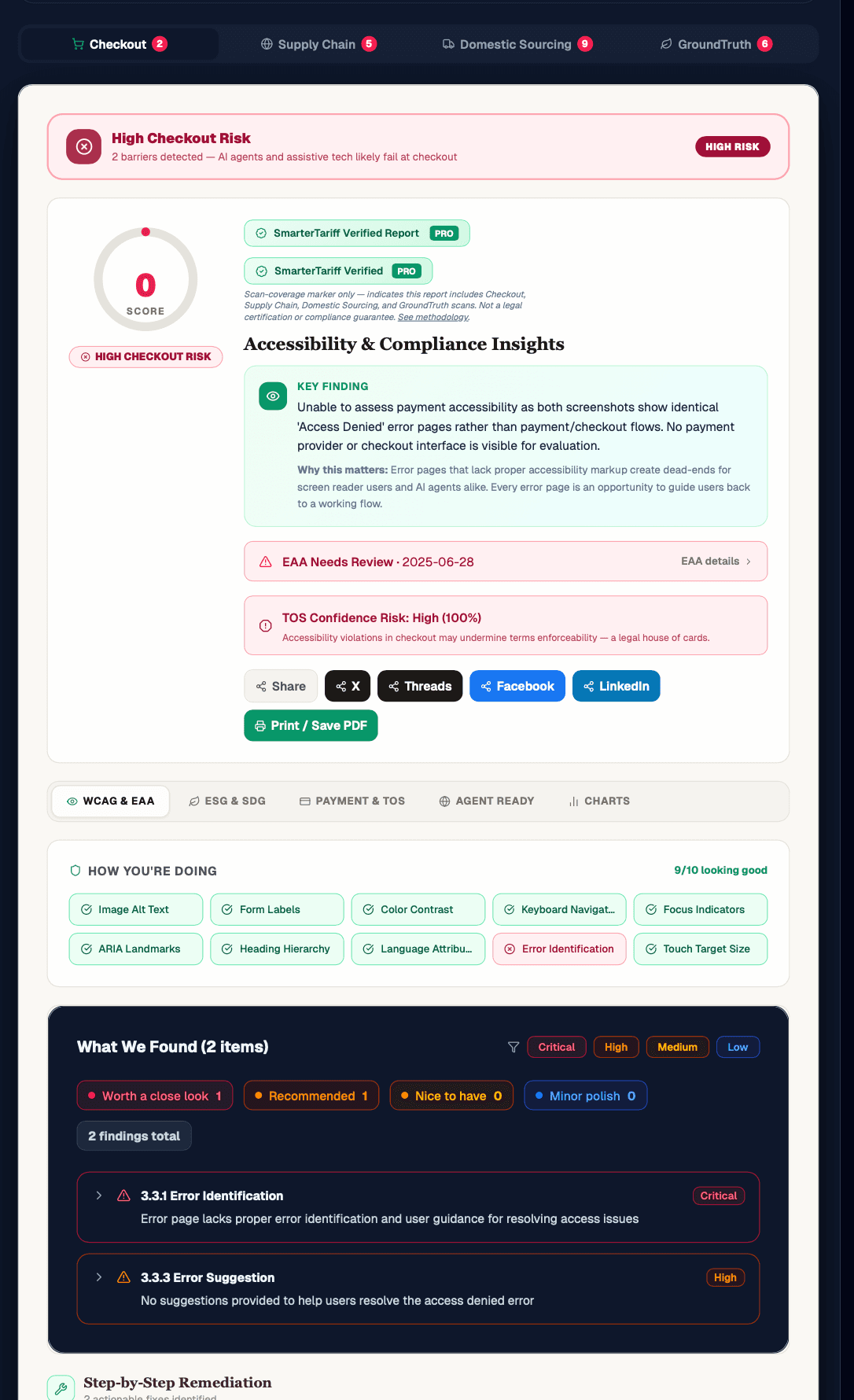
The end-to-end product
Every risk line to your checkout, in one view.
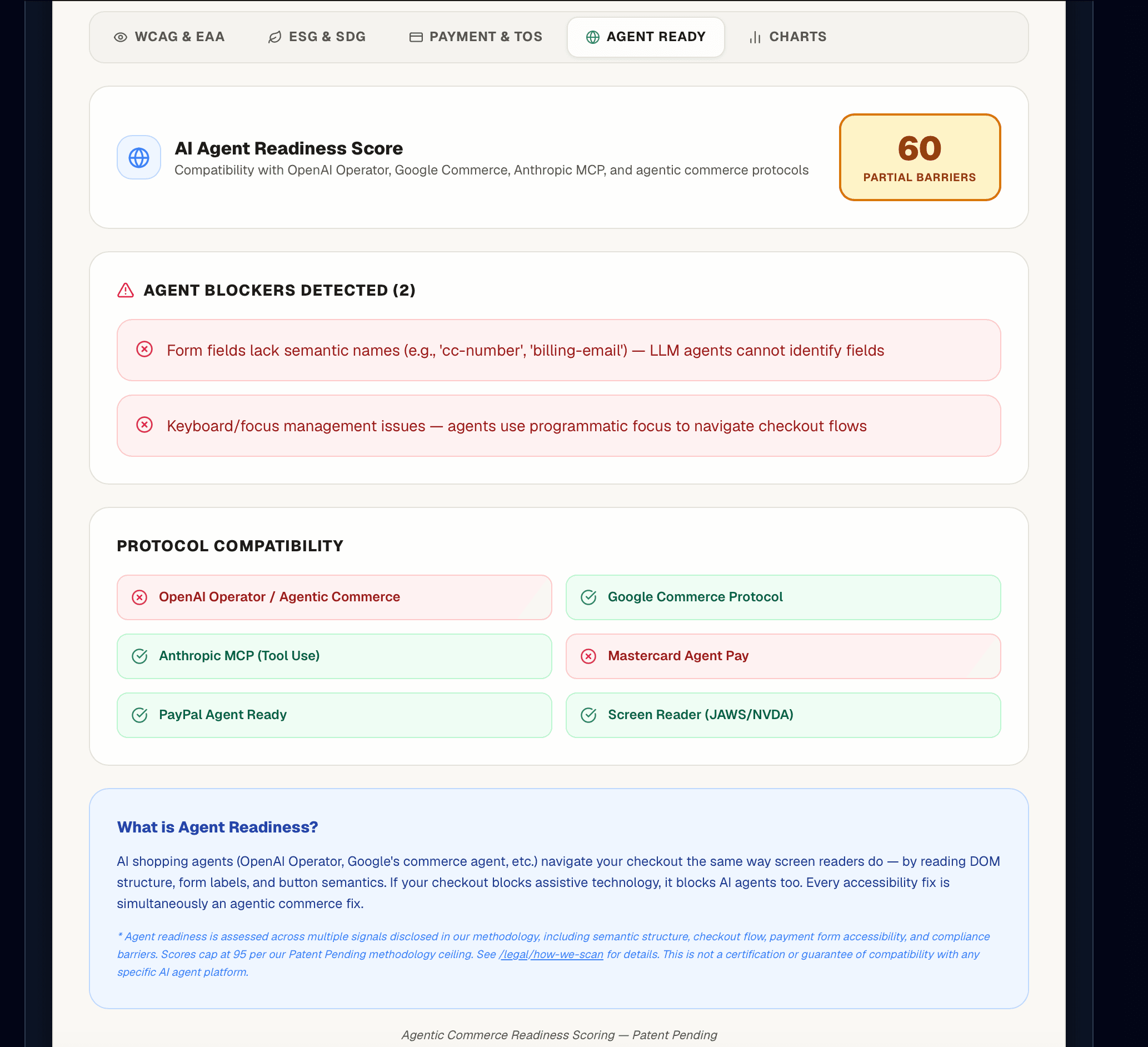
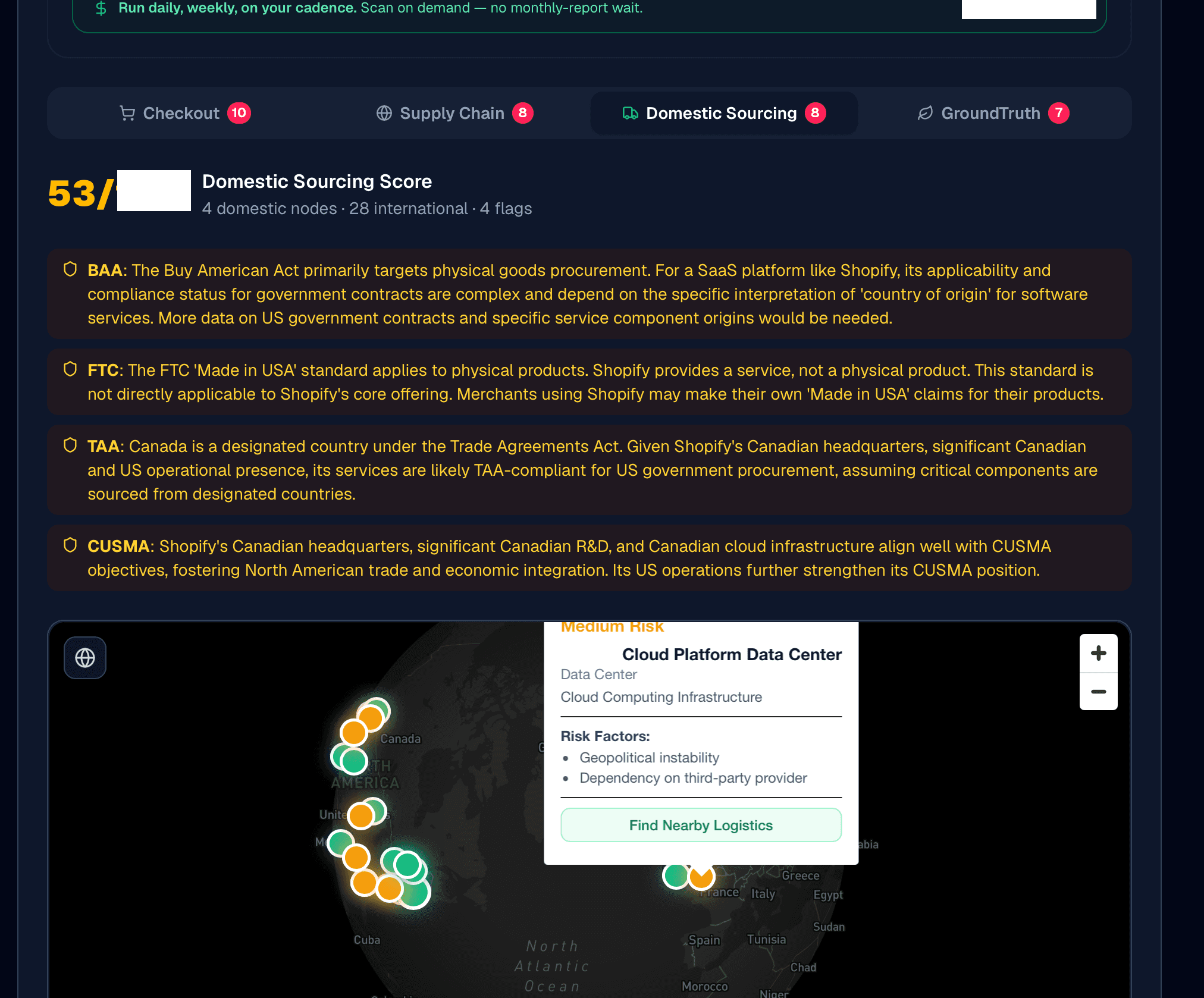
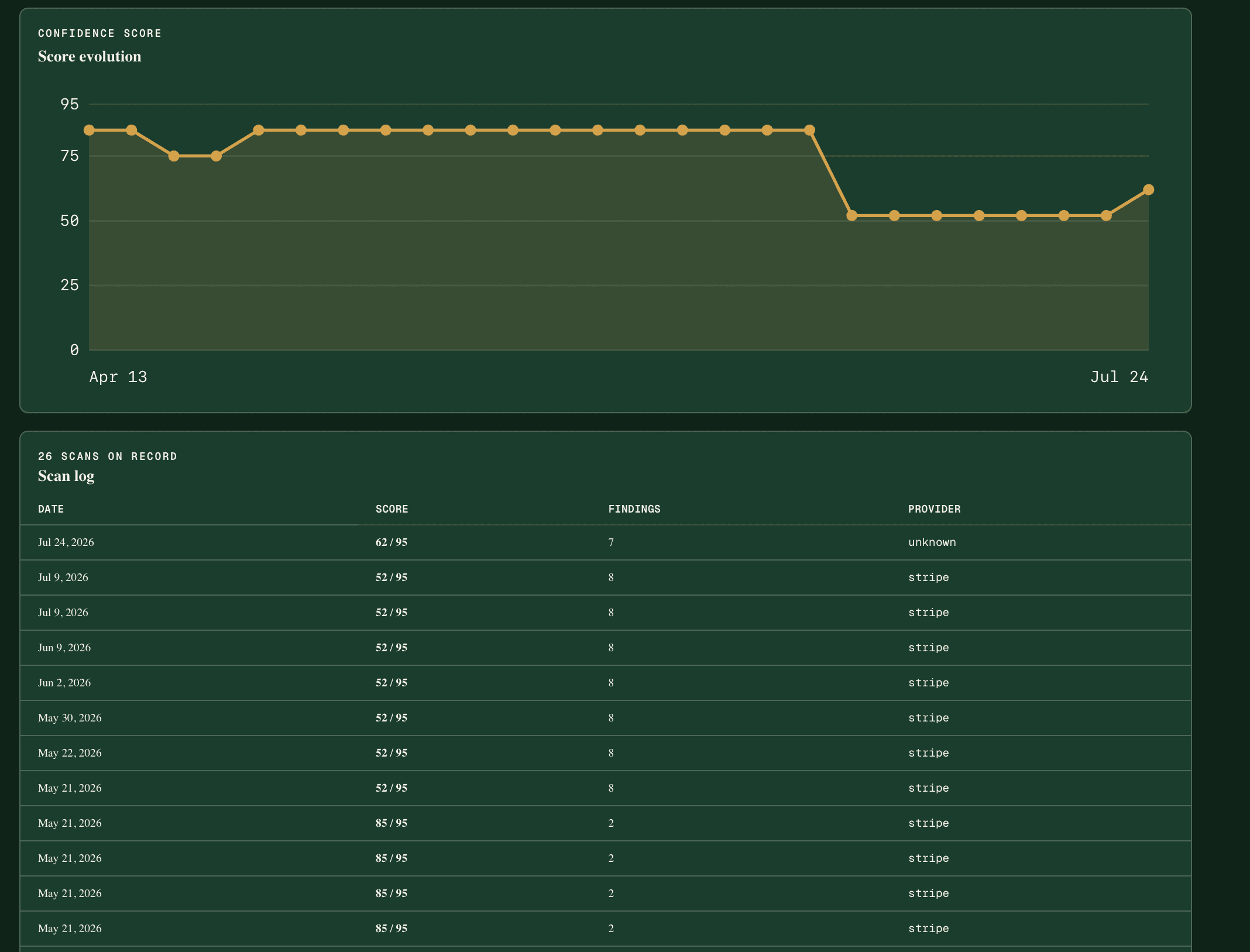
Score maxima and specific vendor names are redacted. The scanner reads the actual rendered page from a public URL, with no integration.
The category is defined. The method is patent-pending. The results are in: public, non-invasive, from a single URL. Documented, dated, and built before the market arrived. You can’t buy the time machine; the rest is hindsight.
Technology for all users, measured against the world’s shared goals.
We build and measure against the 17 United Nations Sustainable Development Goals: the most widely adopted, internationally understood framework for inclusive, durable progress.
An estimated 1.3 billion people, roughly 1 in 6 of us, experience significant disability (World Health Organization, 2023). When a checkout or an AI shopping agent cannot be used, those people are left out of the transaction.
A framework anchored to universal human rights does not depend on any one country’s politics. Administrations change, priorities shift, political seasons turn. The UN Sustainable Development Goals, and the inherent dignity of access, do not. That is what keeps a standard we hold to from being a slogan: it rests on a foundation built to be jurisdiction-agnostic, grounded in a dignity no border can revoke.
For corporate development or legal inquiries, email chris@smartertariff.com with your role and organization. Serious inquiries are reviewed personally; we respond with next steps in coordination with counsel.